Biggest Pro Click V2 Vertical Buying Mistakes (And How to Avoid Them)
Introduction
The Pro Click V2 Vertical has become a popular option for people looking to reduce wrist strain and improve comfort during long computing sessions. As vertical mice move into mainstream office and creative workflows, buyers are increasingly faced with a range of choices and trade-offs. This article examines the most common mistakes shoppers make when choosing the Pro Click V2 Vertical and provides practical guidance to avoid them. It also delivers a focused product review, objective pros and cons, a comparison to common alternatives, and a buying guide that emphasizes real-world use cases.
Why ergonomics matter — and what vertical mice change
Traditional flat mice encourage pronation of the forearm (the palm facing down), which for some users over long periods can contribute to discomfort, tendon strain, and repetitive stress symptoms. Vertical mice rotate the hand into a handshake position, which reduces muscle tension in the forearm and wrist for many people. That said, an ergonomic benefit is not automatic: fit, grip, button placement, and hand size all influence whether a vertical design will improve comfort in practice.
Common buying mistakes and how to avoid them
Mistake 1: Assuming "vertical" equals one-size-fits-all
Many buyers assume that because a mouse is labeled vertical it will suit every hand. In reality, vertical mice come in different sizes, angles, and shapes. A mouse that relieves discomfort for one person can feel awkward and increase strain for another.
How to avoid it: measure hand length and width and compare to vendor sizing guides where available. If possible, try the shape in a store or at a friend’s workplace. Pay attention to the tilt angle — some users prefer a gentler incline while others want a more upright posture.
Mistake 2: Ignoring grip style
Users typically adopt a palm, claw, or fingertip grip. The button reach, thumb rest, and contouring of the Pro Click V2 Vertical will interact differently with each grip type. Buying without considering grip style can lead to misaligned knuckles or awkward finger angles.
How to avoid it: identify one’s dominant grip and look at product photos and descriptions to see if the thumb rest and primary button placement match that grip. Read user reviews specifically mentioning grip comfort rather than generic praise.
Mistake 3: Overlooking connectivity needs
Some vertical mice only support a single connectivity mode (e.g., 2.4 GHz dongle) while others add Bluetooth or multi-device pairing. A buyer who needs dual-computer switching or compatibility with tablets may regret a product with limited wireless options.
How to avoid it: list the devices the mouse must work with (laptop, desktop, tablet, kiosk) and confirm supported protocols. If the Pro Click V2 Vertical will be used across machines, prefer models with multi-host switching or both Bluetooth and a wireless receiver.
Mistake 4: Neglecting software and customization
For office workflows and creative applications, programmable buttons and sensitivity adjustments are important. Not all manufacturers provide robust driver software or cross-platform utilities; sometimes features are Windows-only.
How to avoid it: check whether customization software is available for macOS and Linux if needed, and whether button remapping, DPI/sensitivity steps, and profile storage are supported without persistent cloud sign-in. Confirm whether customization persists on the device or needs a host system to be active.
Mistake 5: Focusing on specs (DPI, polling) over ergonomics
Vertical mouse buyers often get distracted by high DPI numbers and gaming-style metrics that matter less for office productivity. Ergonomics, button feel, and how the mouse supports natural posture are far more important for the typical vertical mouse use case.
How to avoid it: prioritize comfort, build quality, and proven relief of wrist/forearm strain. Treat DPI as a convenience rather than a primary selection criterion unless the user’s workflow specifically needs high sensitivity (e.g., high-resolution displays or specialized CAD work).
Discover deals on Electronics — updated daily.
Browse Now →Mistake 6: Not checking return policy and trial period
Because ergonomics are personal, buyers who purchase without a reasonable return window risk being stuck with a product that increases discomfort.
How to avoid it: buy from vendors that offer an adequate trial period or flexible returns, or test the mouse in-store when possible. If medical or occupational concerns exist, consult with an occupational therapist for fit recommendations before committing.
Pro Click V2 Vertical — Detailed product review and analysis
This review-oriented analysis focuses on the Pro Click V2 Vertical as an ergonomic vertical mouse option for productivity users. The evaluation covers design, ergonomics, controls, connectivity, performance, and real-world suitability for different types of users.
Design and ergonomics
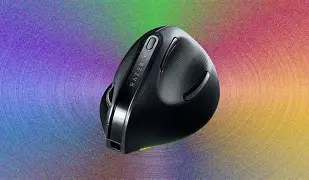
The Pro Click V2 Vertical adopts a handshake orientation designed to reduce pronation. Its profile slopes gently to support the palm while offering a distinct thumb ledge. Users report that the shape encourages a relaxed grip and that the thumb rest helps keep the hand centered over the sensor. However, fit is critical: large-handed users may find the mouse too compact, while very small hands might not seat comfortably depending on the exact contour.
Buttons and controls
Most vertical mice, including this model, place the primary left and right buttons along the front edge, with a scroll wheel aligned vertically. Additional side buttons typically provide back/forward navigation and can be remapped. The placement of these extra buttons on the Pro Click V2 Vertical tends to favor office tasks—web browsing, document navigation, and basic macro triggers—rather than fast-paced gaming.
Connectivity and multi-device use
Connectivity options often include a wireless receiver and Bluetooth. Multi-host capability is useful for designers a…Battery and build quality
Battery life is a practical concern for wireless vertical mice. The Pro Click V2 Vertical aims for extended battery life through power management and efficient sensors. Build quality impacts long-term comfort; the feel of the buttons, the scroll wheel resistance, and the texture of the thumb rest determine whether the mouse remains pleasant after months of daily use.
Software and customization
Robust customization software improves productivity by assigning common commands to side buttons and creating application-specific profiles. Buyers should verify whether settings are writable to the mouse's onboard memory or tied to a desktop utility, and whether macOS and Linux are supported if those platforms matter for the buyer’s workflow.
Performance and real-world use cases
For office professionals, developers, writers, and those doing occasional graphic work, the Pro Click V2 Vertical typically provides a comfortable compromise between precision and ergonomic design. In CAD or photo editing, users who rely on very fine pointer control should test sensitivity adjustments and how the mouse performs at lower speeds. For gamers, a vertical mouse is seldom the primary choice—gaming requires different ergonomics and rapid, low-latency clicking—but casual gaming can still be comfortable.
Pros & Cons
- Pros
- Ergonomic handshake design reduces forearm pronation and can relieve wrist strain
- Comfortable thumb rest and sculpted body for sustained use
- Useful programmable buttons for productivity workflows
- Wireless connectivity and potential multi-host support for flexibility
- Generally good build quality targeted at office users
- Cons
- Fit is highly personal—size mismatch can negate ergonomic benefits
- Software customization may be platform-limited or required for advanced features
- Not optimized for high-intensity gaming or rapid flick movements
- Potential learning curve for users switching from flat mice
- Battery life varies with usage and may require periodic charging or battery swaps
How it compares — quick reference table
| Feature | Pro Click V2 Vertical | MX Vertical (typical competitor) | Anker / Budget Vertical Model |
|---|---|---|---|
| Ergonomic fit | Balanced handshake shape aimed at office users | Slightly larger, steeper tilt for pronounced handshake posture | Compact; may fit smaller hands but less sculpted |
| Connectivity | Wireless receiver + likely Bluetooth / multi-host options | Multi-host Bluetooth + USB receiver, established switching | Often USB receiver only; Bluetooth on select models |
| Customization | Onboard buttons, vendor software for remapping | Advanced software with cross-platform profiles | Limited or no dedicated software |
| Battery & Build | Solid office-grade build; battery life geared for daily use | Premium materials and long battery life | Good value but lower-grade materials; variable battery life |
| Intended users | Office professionals, frequent computer users, ergonomic-first buyers | Power users and professionals seeking premium ergonomic fit | Casual users and budget-conscious buyers testing vertical form |
Buying guide: choosing the right Pro Click V2 Vertical for real-world needs
The right vertical mouse depends on several real-world considerations: hand size, dominant tasks, preferred grip, device ecosystem, and whether the buyer needs portability or a stationary desktop solution. The following checklist and guidance will help buyers make an informed decision.
1. Know your hand measurements and grip
Measure from the base of the palm to the tip of the middle finger for length, and across the widest point of the palm for width. Compare these against sizing charts where available. Decide whether you primarily use a palm, claw, or fingertip grip and look for a design that supports that style.
2. Identify primary use cases
Common use cases influence required features:
Looking for the best Electronics deals on Amazon?
See Deals →- Office/Email/Browsing: prioritize comfort, battery life, and back/forward buttons.
- Productivity/Coding: programmable buttons and multi-host switching help workflow.
- Design/CAD: ensure adjustable sensitivity and precise tracking at low speed.
- Gaming: consider whether a vertical mouse suits the game genre; many competitive titles favor flat mice.
3. Confirm compatibility and software support
Check whether the customization utility supports the operating systems in use. For macOS and Linux users, confirm driver availability or whether basic functions work without software. If profiles or macros are critical, verify whether settings save to the mouse or require software to be active.
4. Evaluate connectivity and travel needs
If the user switches between a laptop and desktop, multi-host switching or both Bluetooth and a USB receiver are essential. For mobile users, confirm whether the wireless receiver stores in the mouse and whether the mouse can be quickly re-paired.
5. Assess build quality and maintenance
Inspect the tactile feel of buttons (firm vs. mushy), the scroll wheel resistance, and the surface texture. Consider replaceable parts such as feet or swappable batteries. For shared workstations, features like durable coatings and easy-to-clean surfaces matter.
6. Try before committing when possible
Because ergonomics are subjective, testing a mouse in person for 15–30 minutes can reveal much more than reading specifications. Look for vendors with trial periods or generous return policies if an in-person test isn’t possible.
7. Consider long-term ergonomics and support
Ergonomic benefit is a long-term outcome. Factor in warranty, customer support, and whether the manufacturer provides firmware updates or long-term driver support. A good warranty and responsive support can make a significant difference if defects or compatibility issues arise.
Real-world scenarios and tips for maximum benefit
These examples illustrate how different professionals might approach choosing and using a vertical mouse like the Pro Click V2 Vertical.
Scenario: Software developer with two machines
A developer switching between a desktop and a laptop should prioritize multi-host switching and reliable reconnection. Assign common IDE navigation or window management shortcuts to side buttons to reduce keyboard reliance. Ensure the mouse works consistently across both operating systems used.
Scenario: Graphic designer using high-resolution displays
Precision is key. Test pointer speed and adjust sensitivity to avoid overshoot on large canvases. Map tool-switching or brush-size controls to spare buttons to keep hands on the mouse more often and maintain a neutral wrist position.
Scenario: Remote worker with repetitive strain history
Consult with a medical professional for tailored advice. Use the Pro Click V2 Vertical with frequent microbreaks and complement it with an ergonomic keyboard and monitor setup. Track pain or discomfort and revert to a conventional mouse if symptoms worsen.
Conclusion
Buying a vertical mouse such as the Pro Click V2 Vertical can be a meaningful step toward improved comfort and reduced wrist strain—if the purchase is made with attention to fit, grip, connectivity, and software needs. The most common mistakes buyers make are avoidable: measure hands, consider grip style, verify multi-device support, prioritize ergonomics over headline specs, and secure a reasonable trial period. By following the practical recommendations in this article, shoppers can better match the Pro Click V2 Vertical to their real-world workflows and increase the likelihood that the mouse delivers the intended ergonomic and productivity benefits.