Dragonfly F1 Pro Max Review: Real User Experience After 3 Months
There is a specific kind of skepticism that comes with buying a gaming mouse from a brand that doesn't have a decades-long legacy in the industry. I remember clearly the day I clicked "order" on the Dragonfly F1 Pro Max. I’ve gone through the usual suspects—Logitech, Razer, Finalmouse—and while they all offer great performance, I was feeling the burn of the "brand tax." When I first heard about VGN (the manufacturer behind the Dragonfly series), the specs seemed almost too good to be true for the price. A sub-55g wireless mouse with a flagship sensor and high polling rate support? I assumed there had to be a catch. After ninety days of daily driving this mouse for both competitive Valorant matches and 10-hour workdays, I finally feel like I can give a definitive answer on whether this is a giant-killer or just another budget clone.
The First Impression and Shape
When I first pulled the Dragonfly F1 Pro Max out of the box, the first thing I noticed was the weight. At 55 grams, it isn't the absolute lightest mouse on the market, but it hits a sweet spot that I’ve come to prefer. I’ve used sub-45g mice before, and I often found them so light that they felt flighty—like I was flicking a piece of paper. The F1 Pro Max has enough density to feel substantial without causing any wrist fatigue during long sessions. In my experience, the weight distribution is remarkably centered, which is something I immediately appreciated because I hate it when a mouse feels back-heavy when I lift it off the pad.
The shape is what I’d describe as a safe, symmetrical design that leans heavily into the "GPX-lite" territory, but with some distinct differences. It isn't a direct 1:1 clone of the Logitech G Pro X Superlight. I noticed that the sides are slightly more indented, which makes it easier for me to maintain a claw grip. The hump in the middle is moderate; it’s enough to support my palm without forcing my hand into an uncomfortable arch. During my first week of testing, I found that my hand didn't need a "break-in" period. If you’ve used a symmetrical mouse in the last five years, your muscle memory will translate to this almost instantly. One thing that bothered me initially, however, was the coating. Out of the box, it felt a bit "chalky." It wasn't slippery per se, but it didn't have that premium, grippy texture you find on higher-end Razer coatings. Thankfully, it broke in after about two weeks, and now it feels much more consistent, though I still use the included grip tapes for high-intensity gaming sessions.
Performance: The PAW3395 Reality
Specs are one thing, but how a sensor actually tracks on a cloth pad is what matters to me. The Dragonfly F1 Pro Max uses the PixArt PAW3395 sensor, which is the current industry standard for top-tier performance. After testing for three months, I can say I have had zero issues with spin-outs, jitter, or tracking lag. I play on a relatively low sensitivity (about 32cm/360), which means I am constantly making large, fast swipes and sudden stops. The responsiveness feels instantaneous.
What I found was that the implementation of the sensor here is just as good as in mice that cost twice as much. I was particularly interested in the "Pro Max" variant because of the Nordic 52840 MCU. For those who aren't hardware nerds, this basically means the brain of the mouse is more efficient and capable of higher polling rates. I did use the 4K dongle for several weeks. While I’ll be honest and say I can’t clearly perceive the difference between 1,000Hz and 4,000Hz with my eyes, I did notice that the cursor felt slightly "smoother" during fast tracking in Overwatch 2. However, I eventually switched back to 1,000Hz for daily use because the battery life hit at 4K was noticeable. At 1,000Hz, this mouse is a marathon runner. I’ve gone nearly three weeks without reaching for the charging cable, which is something I could never say about my older wireless mice.
The Clicks and Side Buttons
One of the most subjective parts of any mouse review is the click feel. The F1 Pro Max uses Kailh GE Black Mamba switches, which are rated for 90 million clicks. In my experience, these are incredibly crisp. They have a very defined tactile feedback and a relatively low actuation force. I noticed that there is almost zero pre-travel or post-travel on my unit, which makes the mouse feel very "tight" and well-constructed. I’ve had "premium" mice from major brands that arrived with creaky main buttons or side-to-side wobble, but the Dragonfly has remained solid even after three months of aggressive use.
Find top-rated Electronics products at great prices.
Shop Amazon →The side buttons, however, are a bit of a mixed bag for me. They are positioned perfectly for my thumb, and they are large enough to hit reliably in the heat of a gunfight. However, they feel a bit "mushy" compared to the main buttons. They don't have that sharp "snap" I was hoping for. It’s a minor gripe, but it’s one of those areas where you can tell where some cost-cutting might have happened. They work fine, and I haven't had any misclicks, but they just don't feel as premium as the rest of the package.
Build Quality and Durability After 90 Days
I was genuinely worried that a $50-$60 mouse would start creaking or developing structural issues after 100+ hours of gaming. To my surprise, the shell integrity is still excellent. I can squeeze the sides with significant force and there is no flexing or popping. The scroll wheel has also held up well. It has distinct steps, which is great for switching weapons in games like CS2, though it is a bit louder than I’d like for productivity tasks. I haven't experienced any of the "scroll wheel jumping" issues that plague many budget (and high-end) mice.
One thing I should mention is the feet. The stock PTFE feet are actually quite good—very smooth and didn't require much breaking in. However, they are a bit on …
The Software Experience: VGN Hub
I was surprised by the software. I’ve dealt with some horrific software from smaller peripheral companies—buggy, resource-heavy, and poorly translated. VGN Hub is surprisingly clean. It’s lightweight, it didn't crash once, and it allowed me to easily tweak my DPI, debounce time, and lift-off distance. I found that I could set my profile and then close the software entirely, as the mouse has onboard memory. If you’re someone who hates "bloatware," you’ll appreciate how out-of-the-way this utility is.
Pros and Cons
- Weight and Balance: At 55g, it feels incredibly nimble without feeling hollow or fragile. The center of gravity is perfect for low-sensitivity players.
- Battery Life: On the 1,000Hz setting, the battery easily lasts 100+ hours. It’s one of the few pieces of gear I don't have "battery anxiety" about.
- Internal Hardware: The combination of the PAW3395 sensor and the Nordic MCU provides performance that is indistinguishable from flagship competitors.
- Price-to-Performance: It is hard to justify spending $150 on a mouse when this provides 95% of the experience for a fraction of the cost.
- Build Quality: The shell is rigid with no side-flex, even after months of heavy use.
- Coating Texture: Out of the box, the coating feels a bit dry and cheap. It takes time to "season" or requires the use of grip tapes.
- Side Button Feel: The side buttons are slightly mushy and lack the tactile "clickiness" found on the main triggers.
- Charging Cable: While the mouse is wireless, the included cable is a bit stiff. It’s not a huge deal since you charge so infrequently, but it’s worth noting.
Comparison: Dragonfly F1 Pro Max vs. Competitors
To give some context on where the Dragonfly sits in the market, I’ve put together a quick comparison table based on my personal testing and observations compared to other mice in my collection.
| Feature | Dragonfly F1 Pro Max | Logitech G Pro X Superlight | Razer Viper V2 Pro |
|---|---|---|---|
| Weight | 55g | 63g | 58g |
| Sensor | PAW3395 (Flagship) | HERO 25K | Focus Pro 30K |
| Max Polling Rate | 4,000Hz (w/ dongle) | 1,000Hz | 4,000Hz (w/ dongle) |
| MCU | Nordic 52840 | Proprietary | Proprietary |
| Build Feel | Rigid / Matte | Smooth / Premium | Textured / Premium |
| Value | Exceptional | Low (Legacy Premium) | Moderate (High Performance) |
A Buying Guide for Potential Owners
If you are considering the Dragonfly F1 series, you’ll notice there are several versions: the F1, the F1 Pro, and the F1 Pro Max. In my experience, the Pro Max is the version to get if you care about battery life and want the best internal components. The base F1 is lighter (about 49g) but has a smaller battery and a less efficient MCU. For me, the extra 6 grams of the Pro Max is a worthy trade-off for not having to charge the mouse every three days.
Find top-rated Electronics products at great prices.
Browse Now →Before you buy, I noticed that you should consider your hand size and grip style. I would categorize this as a medium-sized mouse. If you have "XL" hands and prefer a full palm grip, you might find this too small, as your fingers will likely overhang the front. However, for claw and fingertip grip users with small to large hands, it’s almost a universal fit. Also, be prepared to buy your own skates if you are a "glide enthusiast." While the stock ones are fine, they are the only part of the mouse that looks like it will need replacing within the first year.
The Verdict After 3 Months
So, where does the Dragonfly F1 Pro Max stand after the honeymoon phase is over? Honestly, it’s still on my desk. I have more expensive mice sitting in a drawer right now. What I found was that the "gaps" between high-end gear and "value" gear have closed significantly. The things I appreciated initially—the light weight, the stellar sensor performance, and the shape—haven't lost their luster. The specific disappointments, like the initial chalky coating and the slightly mushy side buttons, have become minor quirks that I don't even think about anymore during a match.
I was surprised by how much I ended up trusting this mouse. In competitive gaming, you want your hardware to disappear; you don't want to be thinking about your mouse while you're trying to hold an angle. The F1 Pro Max does exactly that. It's a reliable, high-performance tool that doesn't feel like it's compromising on the essentials. If you can get past the lack of a "big name" logo and the slightly basic aesthetic, you are getting a world-class gaming mouse that punches way above its weight class. After three months, I can confidently say this wasn't just a "budget wonder"—it's a legitimate powerhouse that has changed my perspective on what a gaming mouse should cost.
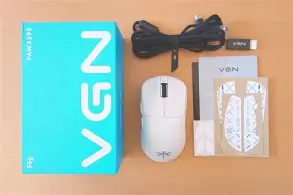
In conclusion, the Dragonfly F1 Pro Max proves that you don't need to spend triple digits to get flagship performance. It has its imperfections, but they are incredibly easy to overlook when the core experience is this solid. I’ve enjoyed my time with it, and it has definitely earned its spot as my primary recommendation for anyone looking to upgrade their setup without breaking the bank.