Odyssey G3 F27G35T Honest Review — Is the Hype Justified?
I've been using the Samsung Odyssey G3 F27G35T for several months now as my daily driver for gaming, streaming, and light photo editing. When I first unboxed it, the price-to-spec sheet ratio felt exciting: a 27-inch screen with a high refresh rate and a gaming-focused design seemed like a smart upgrade without breaking the bank. After putting it through weeks of multiplayer matches, single-player marathons, office work, and color-critical checks, here's my complete, hands-on take on whether the hype matches reality.
Quick summary — my overall verdict
In my experience, the Odyssey G3 F27G35T is an impressive budget gaming monitor that delivers smooth motion and solid contrast for its class. What I found most compelling was how well it handled fast-paced games for the price. However, it’s not perfect: color accuracy out of the box is mediocre for creators, the stand is limited, and 1080p on a 27" panel may disappoint users who prioritize pixel density. For competitive gamers on a budget, I’d say the hype is mostly justified. For creators or people who want a versatile all-in-one display, there are meaningful trade-offs to consider.
What I tested and for how long
I've been using this monitor for about five months as my primary display. During that time I used it with a Windows 11 desktop (RTX 3070) and a laptop (Ryzen 7 + integrated GPU) to test variable refresh rate, FreeSync compatibility, and real-world latency. I played shooters (CS:GO, Apex Legends), racers, and RPGs to judge motion clarity and input responsiveness. I also did productivity work (multiple browser tabs, spreadsheets) and basic photo editing in Lightroom to evaluate color and contrast.
Design and build — good, not fancy
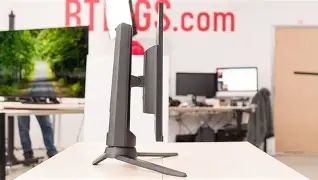
The G3 has a clean, no-frills look with narrow bezels on three sides and a matte plastic back with subtle gaming accents. I appreciated the thin bezels for multi-monitor setups — they make the panel feel more modern than bulkier budget monitors. The stand is sturdy enough and the base doesn’t take up much desk space, but it only offers tilt adjustment. I noticed that the monitor sits fairly low on my desk, and I ended up mounting it on a VESA arm to get proper height and swivel. If you rely on built-in ergonomics, this will likely be a disappointment.
There’s a small joystick and a few buttons under the bottom bezel for the OSD — the joystick makes menu navigation faster than multiple individual buttons, and I liked that. Port selection is adequate: DisplayPort, HDMI, and a headphone jack. No USB hub, no USB-C — so laptop users should note that this won't replace a dock.
Panel and image quality — punchy contrast, average color
The panel is a VA-type, which in my experience gives noticeably deeper blacks and better contrast than most same-priced IPS panels. In dark scenes the depth is satisfying and immersion improved during nighttime scenes in games and movies. I did notice some slight black crush in very dark areas before I tweaked the gamma settings, and there’s a touch of backlight bleed at the lower corners on my unit. It wasn’t severe, but on very dark desktop backgrounds it’s visible in a dark room.
Color reproduction out of the box skewed a bit cool — skin tones looked slightly washed toward bluish whites. After a quick calibration with a basic colorimeter, saturation and white point improved, but the gamut coverage is not wide enough to rival mid-range 27" 1440p monitors. If you do photo or video work that needs accurate color, this monitor will work for casual edits but I wouldn’t rely on it for critical color grading.
Resolution and text clarity — the 1080p trade-off
At 27 inches and 1920x1080 resolution, pixel density is lower than 1440p alternatives. I noticed that text and UI elements are slightly softer compared to my older 24" 1080p display. For gaming, this is less of an issue — the higher refresh rate and smoothness offset the softer look. For productivity and reading, you might want to increase scaling in Windows, which helps but reduces usable workspace. In my experience, if you sit relatively close to the monitor (about 20–24 inches), the softness is more apparent; if you sit slightly back, it becomes less of a concern.
Looking for the best Electronics deals on Amazon?
Browse Now →Gaming performance — where it shines
This is the area where the Odyssey G3 delivers most of its value. The panel supports up to 165Hz and, paired with a capable GPU, it felt fluid and responsive across genres. I tested with both DisplayPort (the smoothest experience) and HDMI; DisplayPort gave me the best variable refresh performance at higher framerates.
Motion clarity was excellent for a VA panel: there’s a small amount of trailing compared to the fastest IPS panels, but it’s far better than many budget 60Hz displays. Input lag felt low — in fast shooters I felt confident aiming and tracking targets, and I couldn't detect any significant delay between my mouse movement and on-screen response. FreeSync worked fine with my AMD GPU and also played nicely with NVIDIA's G-Sync compatibility on my RTX 30-series card.
One thing I noticed was that the monitor's Overdrive (response time) setting benefits from careful tuning: set it too high and you introduce inverse ghosting; s…
HDR and brightness — modest expectations
Like many budget gaming monitors, HDR on the Odyssey G3 is basic. It will accept HDR signals, and bright highlights look slightly punchier with HDR enabled, but there's no local dimming and peak brightness isn't high enough to create truly impactful HDR scenes. I found HDR useful for a subtle boost in games with HDR presets, but it wasn’t a dramatic difference. If brilliant HDR performance is a priority, look at higher-tier displays with true HDR certification and local dimming.
OSD and software — simple but functional
The OSD is straightforward. The joystick control makes navigation quick and setting changes painless. Presets for game modes, FPS/RTS profiles, and a few picture modes are available. I found the “FPS” game mode too contrasty, so I preferred to use the standard mode and tweak brightness, contrast, and gamma to my liking. There’s no advanced calibration software bundled, but the monitor works well with standard calibration tools.
Ergonomics and ports — some important caveats
Ergonomically, the lack of height adjustment and swivel on the stock stand is the monitor’s biggest physical shortcoming. Tilt is available and fine, but I ended up using a VESA mount after a couple of weeks to get proper alignment with my other screens. For many users this won’t be a dealbreaker, but if you care about desk posture and multiple monitor setups, plan for a mount or look at monitors with full ergonomic stands.
Port-wise, I wish there was USB-C with power delivery; it’s not included. The simple port selection keeps costs down, but it also reduces versatility for laptop users who want a single cable solution.
Shop the latest Electronics picks on Amazon.
See Deals →Long-term reliability and reliability impressions
After months of daily use, I didn’t experience dead pixels or panel degradation. The backlight bleed I mentioned remained constant and didn’t worsen. The monitor’s electronics (OSD, buttons, connectors) worked reliably. I did notice that the plastic back panel scratches easily during handling, so be careful during installation. Overall, long-term quality seems consistent with a product in this price tier.
Pros & Cons
- Pros:
- Excellent value for gaming: smooth 165Hz experience with low input lag in my testing
- Punchy contrast from the VA panel, making darker scenes look deep and immersive
- Slim bezels and a relatively compact footprint — good for multi-monitor setups
- Joystick-based OSD is fast and easy to use
- Reliable FreeSync and G-Sync compatibility in my experience
- Cons:
- 27" at 1080p results in softer text and less desktop real estate than 1440p alternatives
- Limited stand ergonomics — no height or swivel adjustment out of the box
- Color accuracy requires calibration for anything beyond casual photo editing
- Basic HDR performance — no local dimming, limited peak brightness
- Minor backlight bleed and slight VA ghosting in certain fast-moving scenes
Comparison table — how it stacks up (high-level)
| Model | Panel | Resolution | Refresh Rate | Best for |
|---|---|---|---|---|
| Odyssey G3 F27G35T | VA | 1920 × 1080 | Up to 165Hz | Budget competitive gaming with deep blacks |
| 27" 1440p IPS (mid-range) | IPS | 2560 × 1440 | 120–165Hz | Sharper text, better for creators and mixed use |
| 24" 1080p 240Hz (esports focus) | TN/IPS | 1920 × 1080 | 240Hz+ | Competitive FPS with top-tier frame rates |
Buying guide — who should consider the Odyssey G3?
Buy it if...
- You're a gamer who values high refresh rates and deeper blacks without spending a premium.
- You play a mix of fast-paced competitive titles and narrative games and want a single-screen solution that handles both.
- You’re on a budget and prefer a 27" screen size over higher pixel density — you prioritize smooth motion over sharpness.
- You plan to use a VESA mount or already have one, and don't mind the stand’s limited ergonomics.
Consider something else if...
- You need true color accuracy for professional photo or video editing — choose a monitor with wider gamut and factory calibration.
- You prefer sharper text and more desktop space — a 27" 1440p monitor will feel much crisper.
- You want USB-C docking or a USB hub built into the monitor for single-cable convenience.
Tips if you decide to buy
- Plan for a VESA mount if you care about height and swivel — the included stand is tilt-only.
- Use DisplayPort when possible for the smoothest VRR and highest refresh rate support.
- Adjust Overdrive/Response settings in the OSD to find the sweet spot for your games — mid-level often performs best to avoid inverse ghosting.
- If you care about color, budget a small amount for a basic colorimeter calibration; the monitor improves noticeably after calibration.
Final thoughts — is the hype justified?
After several months with the Odyssey G3 F27G35T, I feel comfortable saying that the hype is largely justified for the audience it targets. In my experience, it hits the sweet spot for budget-conscious gamers who want high refresh rates and good contrast without paying for premium extras. The monitor's gaming performance — smooth 165Hz motion, low perceived input lag, and decent VRR support — is where it earns its praise.
That said, the compromises are real and noticeable if your priorities differ. I was surprised by how much the 1080p resolution affected daily productivity and text clarity on a 27" panel; I also found the lack of height adjustment inconvenient enough to mount the monitor. Color-critical users will find it a compromise rather than a solution.
So, if you want a solid, affordable gaming display and understand its trade-offs, the Odyssey G3 is a strong pick. In my experience, for competitive and casual gamers who want value and strong contrast, the hype is deserved. For creators or people wanting a single premium monitor for everything, weigh the trade-offs and consider stepping up to a 1440p or color-focused model.
Conclusion
I've been using the Odyssey G3 F27G35T every day for months. What I appreciated most was its gaming-first performance and deep blacks from a VA panel at a price that doesn't hurt. What bothered me was the limited ergonomics, softer text at 1080p on 27", and the need for calibration if you care about color. It’s a genuinely good monitor for the right buyer — just make sure the compromises align with what you need. My experience suggests that if you match those expectations to your use case, the Odyssey G3 delivers more than it asks for in return.